·45 min read
Building this site: sections, series, an audio player and a tour of the code
What changed on this site in one round of work, with the code: blog sections and series, renamed posts and redirects, a listen-to-this-post audio player (with a follow-up fix for phones and diagram reading), and then a full tour of how the site's code works, from MDX files to static pages.
This site started as a flat list of posts. Then the posts piled up: two long series, a few essays, some systems notes, and an average read time that kept growing. So I added three things: sections and series to organise the blog, a Listen to this post button, and a clean-up of names, URLs and images to match.
This post is the build log for that work, in two parts. Part 1 explains each change and the code behind it. Part 2 is a tour of the whole codebase, so I (and anyone reading) can find their way around later. The code is on GitHub.
| What | Why | Where it lives |
|---|---|---|
| Sections, series and tags | Find posts by topic, and read a series in order | src/lib/sections.ts, src/lib/blog.ts, two new routes |
| Renamed posts, redirects, image folders | Clear names and URLs now that posts sit under a section | next.config.ts, public/images/ |
| Audio player | Posts average a long read, so let people listen | src/components/AudioPlayer.tsx, src/lib/speech.ts |
| Audio fix: phones and diagrams | Playback failed on mobile browsers, and diagrams were skipped | The same two files, plus src/lib/blog.ts for the time estimate |
| AI podcast versions | A conversational, downloadable audio option made with NotebookLM | content/audio.json, scripts/upload-audio.mjs, src/components/RecordedAudio.tsx, findAudio in src/lib/blog.ts |
| Notes | A place for short, text-only thoughts that don't need a post | content/notes/, src/lib/notes.ts, src/app/notes/, NoteList |
#Part 1: What changed
#Why the blog needed structure
Before this change, /blog was one list sorted by date. That has three problems once there are a dozen posts:
- No way to browse by topic. An essay about writing sat between two posts on transformer inference.
- No reading order. The LLM Architectures posts and the Agentic AI posts are series, but that was only implied by titles and hand-written lists at the top of each post.
- Inconsistent tags. Tags like "AI", "LLMs" and "AI Engineering" overlap, so they are poor for browsing.
#Three layers: section, series, tag
| Layer | Question | How many | Set in frontmatter as |
|---|---|---|---|
| Section | Which shelf is this on? | One per post, from a short fixed list | section: "ai-llms" |
| Series | In what order should I read it? | Zero or one per post | series: "agentic-ai" and seriesOrder: 5 |
| Tag | What is it about, in detail? | Any number | tags: ["MCP", "Strands"] |
The reason for three layers and not one: each does a different job, and a post can sit on a shelf without being in a series. Tags stay as they were. Sections are few and change rarely. Series are as many as I like.
A post's frontmatter now looks like this:
---
title: "How agents talk: MCP for tools, A2A for other agents"
date: "2026-10-30"
section: "ai-llms"
series: "agentic-ai"
seriesOrder: 5
tags: ["Agentic AI", "LLMs", "Strands", "MCP"]
---
#One config file for the shelves
The sections and series are defined in one place, src/lib/sections.ts:
export const SECTIONS: Section[] = [
  { slug: "ai-llms", title: "AI & LLMs", description: "How language models work, run and get used: ..." },
  { slug: "systems", title: "Systems & Engineering", description: "..." },
  { slug: "build-logs", title: "Build Logs", description: "..." },
  { slug: "essays", title: "Essays & Ideas", description: "..." },
];

/** Where a post lands when its `section` is missing or misspelled. */
export const DEFAULT_SECTION = "essays";

export const SERIES: Series[] = [
  { slug: "llm-architectures", title: "LLM Architectures", description: "..." },
  { slug: "agentic-ai", title: "Agentic AI", description: "..." },
  { slug: "mit-distributed-systems", title: "MIT Distributed Systems", description: "..." },
];
Adding a new area of writing is one entry in this list. The routes, the chips and the cards all read from it, so none of them change. A series that isn't listed still works: getSeriesInfo makes a title from the slug.
The fallback matters for the future. If I write about something I haven't thought of yet, the post lands in Essays & Ideas with a tag, and I only add a section once three or more posts need it.
#Reading the new fields: parsePost
blog.ts used to build a post object in two places, one for the list and one for a single post. I merged them into one helper, so a new field is added once:
function parsePost(slug: string, fileContent: string): BlogPost {
  const { data, content } = matter(fileContent);
  const stats = readingTime(content);
  const order = Number(data.seriesOrder);

  return {
    slug,
    title: data.title || slug,
    description: data.description || "",
    date: data.date || new Date().toISOString(),
    tags: data.tags || [],
    section: getSection(data.section) ? data.section : DEFAULT_SECTION,
    series: data.series || undefined,
    seriesOrder: Number.isFinite(order) ? order : undefined,
    readingTime: stats.text,
    listenMinutes: estimateListenMinutes(content),
    toc: data.toc !== false,
    content,
  };
}
Three things to notice. A bad section never breaks a build: it falls back to the default. A missing seriesOrder becomes undefined and not NaN. And listenMinutes is new, for the audio player later in this post.
On top of it sit small queries, each a filter over getAllPosts():
export function getPostsBySection(section: string): BlogPost[] {
  return getAllPosts().filter((p) => p.section === section);
}

export function getPostsBySeries(series: string): BlogPost[] {
  return getAllPosts()
    .filter((p) => p.series === series)
    .sort((a, b) => (a.seriesOrder ?? 0) - (b.seriesOrder ?? 0));
}

export function getSeriesPosition(post: BlogPost): SeriesPosition | null {
  if (!post.series) return null;
  const posts = getPostsBySeries(post.series);
  const i = posts.findIndex((p) => p.slug === post.slug);
  if (i === -1) return null;
  return { position: i + 1, total: posts.length, prev: posts[i - 1], next: posts[i + 1] };
}
A series is ordered by seriesOrder, not by date. That matters because two posts in one series can be published on the same day, and a post's date can change.
#Two new routes
| Route | File | What it shows |
|---|---|---|
/blog/topic/[section] | src/app/blog/topic/[section]/page.tsx | One section: chips, its series, its posts |
/blog/series/[series] | src/app/blog/series/[series]/page.tsx | One series, in reading order |
Both are two path segments deep, so they can never collide with /blog/[slug], which is one. Each follows the same pattern as the post page:
export function generateStaticParams() {
  return SECTIONS.map((s) => ({ section: s.slug }));       // build these pages ahead of time
}

export default async function BlogSectionPage({ params }: { params: Promise<{ section: string }> }) {
  const { section: slug } = await params;                   // in this Next.js, params is a Promise
  const section = getSection(slug);
  if (!section) notFound();                                  // unknown section: a 404
  const posts = getPostsBySection(slug);
  // ...render the header, the chips, the series cards and the posts
}
I used real routes and not a ?section= filter on one page, so every section and series has a URL that can be shared, bookmarked and indexed, and every one is built as static HTML.
#The interface
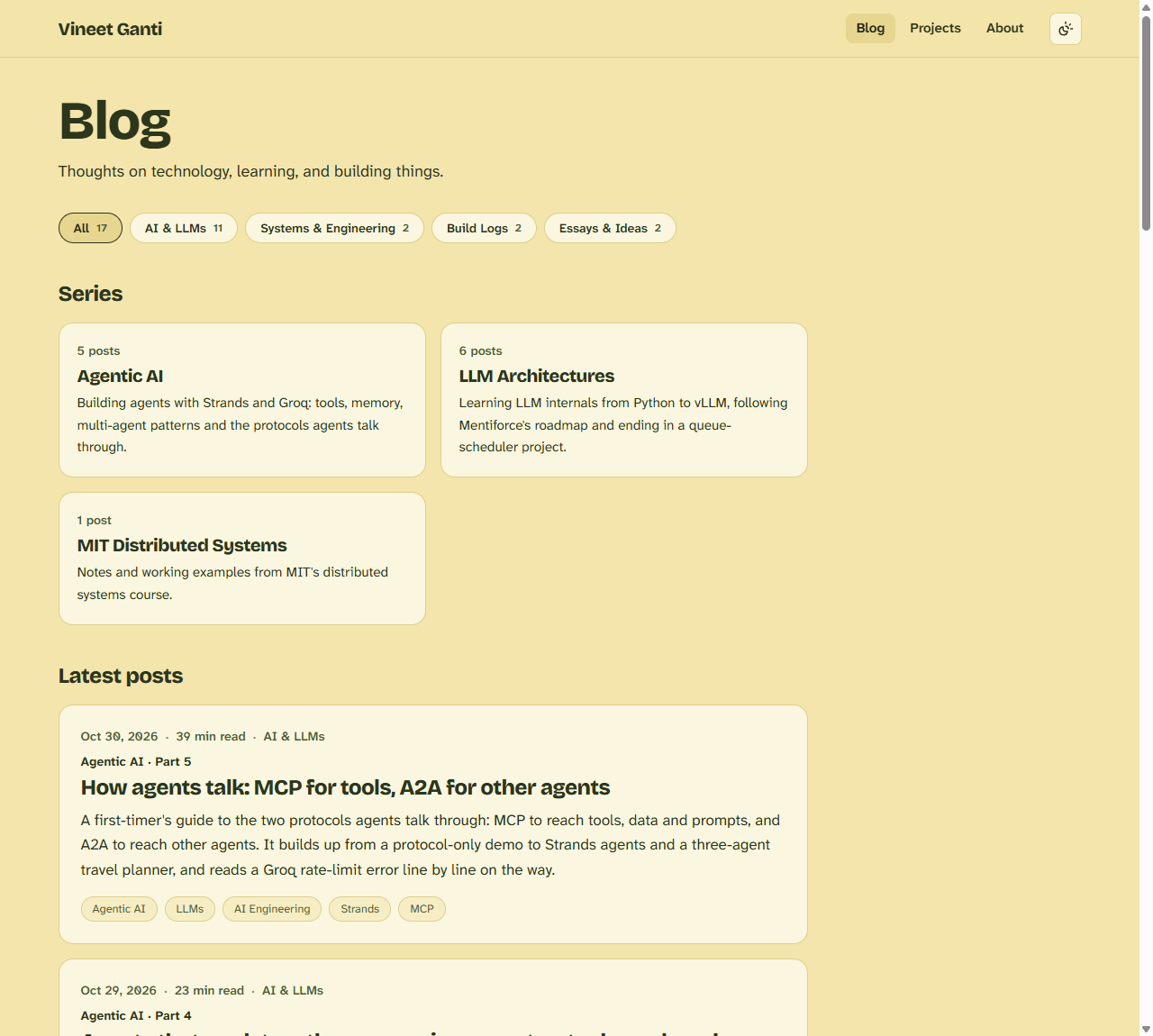
| Component | Job |
|---|---|
SectionNav | The chip row ("All 16", "AI & LLMs 11", ...). Counts come from the posts, and a section with no posts is hidden |
SeriesStrip | Cards for each series with its post count |
SeriesNav | Previous and next links at the end of a series post |
PostCard | Now shows the section and "Series · Part N" |
| Post page header | The section and "Part 5 of 5" as links above the title |
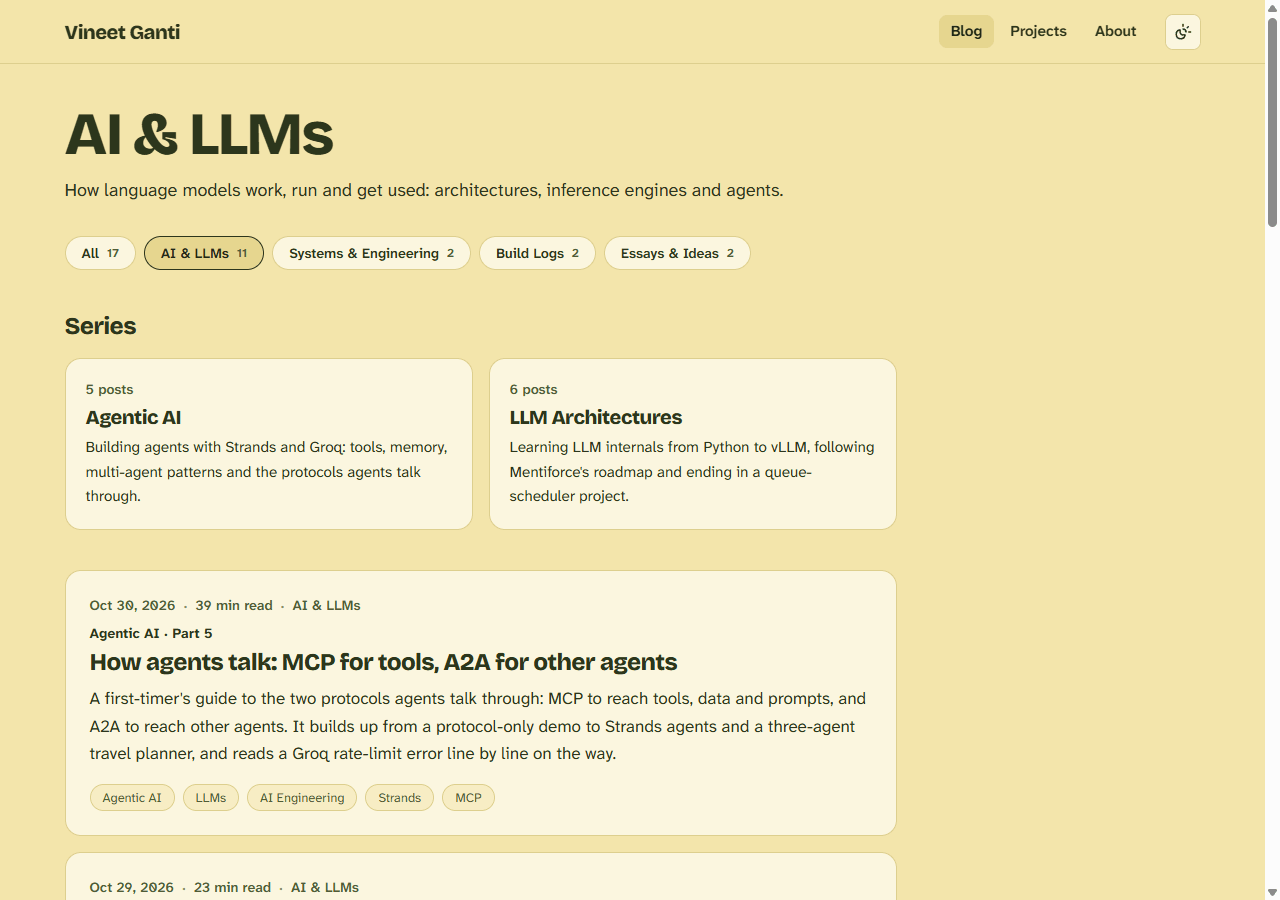
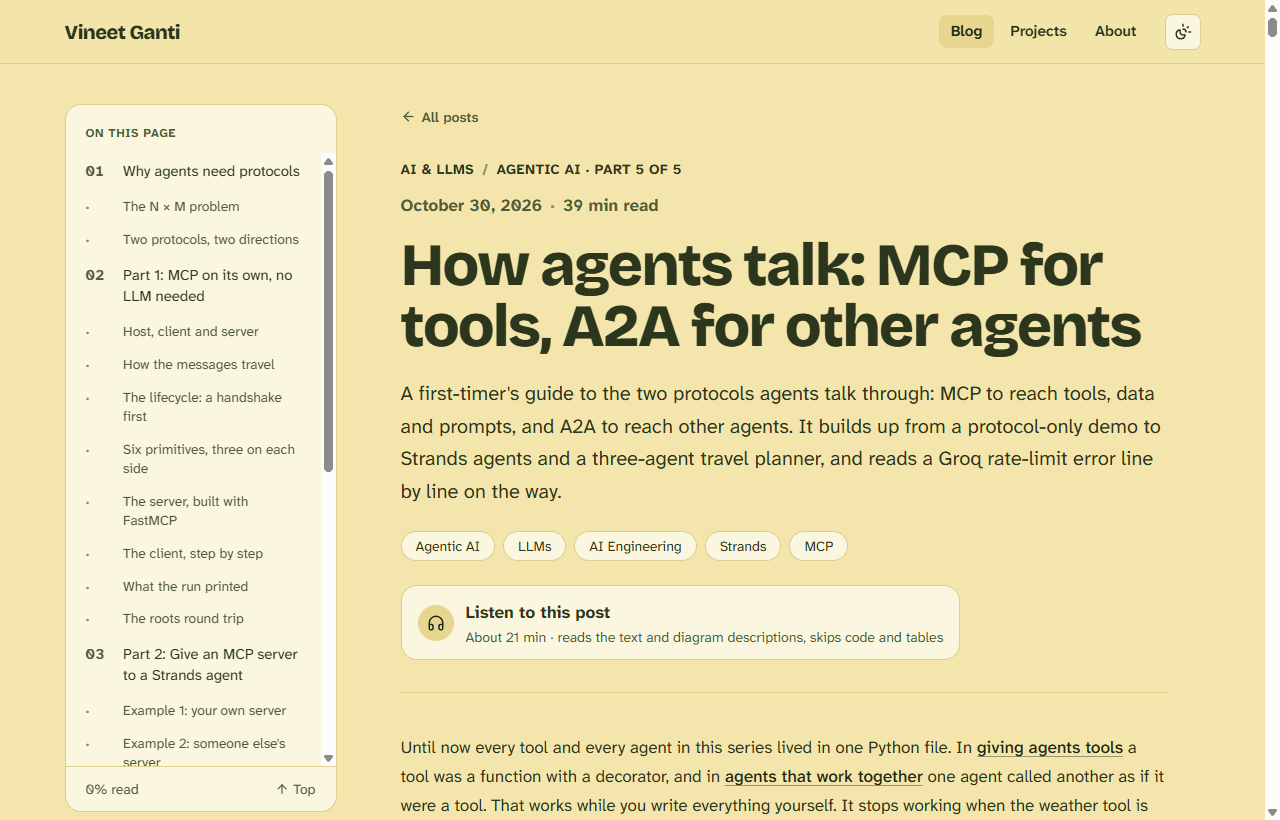
SectionNav takes one prop, the active section. It highlights the chip with aria-current="page", which also tells screen readers where they are.
#Renames, redirects and image folders
With sections in place, the old names stopped making sense. The six LLM posts were called mentiforce01 to mentiforce06, which is the name of the person I credit and not a description. They now have readable slugs, and their titles lost the LLM Architectures - 0N - prefix, because the section and the "Part N of 6" label say that already.
| Before | After |
|---|---|
mentiforce01 | python-internals-for-llms |
mentiforce02 | neural-network-fundamentals |
mentiforce03 | transformer-architecture-principles |
mentiforce04 | transformer-inference-optimization |
mentiforce05 | vllm-inference-engine-design |
mentiforce06 | batching-llm-requests |
| a MapReduce post with spaces in its file name | distributed-systems-mapreduce |
Renaming a published URL breaks every link to it, so next.config.ts redirects the old slugs permanently:
const RENAMED_POSTS: Record<string, string> = {
  mentiforce01: "python-internals-for-llms",
  // ...
  "mit-distributed%20systems%20-%20lecture1": "distributed-systems-mapreduce",
};

async redirects() {
  return Object.entries(RENAMED_POSTS).map(([from, to]) => ({
    source: `/blog/${from}`,
    destination: `/blog/${to}`,
    permanent: true,        // HTTP 308: browsers and search engines remember it
  }));
},
I checked this against a production build: /blog/mentiforce01 answered 308 with the new location, and so did the old MapReduce URL, spaces and all.
The images moved too. They used to sit in loose folders such as public/llm-vllm-engine/. They now follow the same shape as the blog:
public/images/<section>/<series>/<post-slug>/diagram.svg
public/images/ai-llms/agentic-ai/how-agents-talk/summary-map.svg
public/images/essays/ideal-chat-app/message_send_flow.png     (no series, so straight under the section)
I put them under images/ and not blog/ on purpose: a folder named public/blog/ would share the /blog/... URL space with the pages. In total, about 170 image references were rewritten.
#Checking the move
A migration like this is easy to get subtly wrong, so I wrote a throwaway script that compiles every post with the same MDX plugins as the site and checks:
- every post compiles;
- every
sectionis a known one, and every series hasseriesOrdervalues 1 to n with no gaps; - every image exists, and lives under its own section's folder;
- every
/blog/...link and#anchorpoints at something real; - no image in
public/imagesis orphaned; - no post still mentions an old slug.
Then next build for the type-check and the prerendered pages, and a production server to check the redirects and routes over HTTP.
#The audio player
#Why the browser's own voice
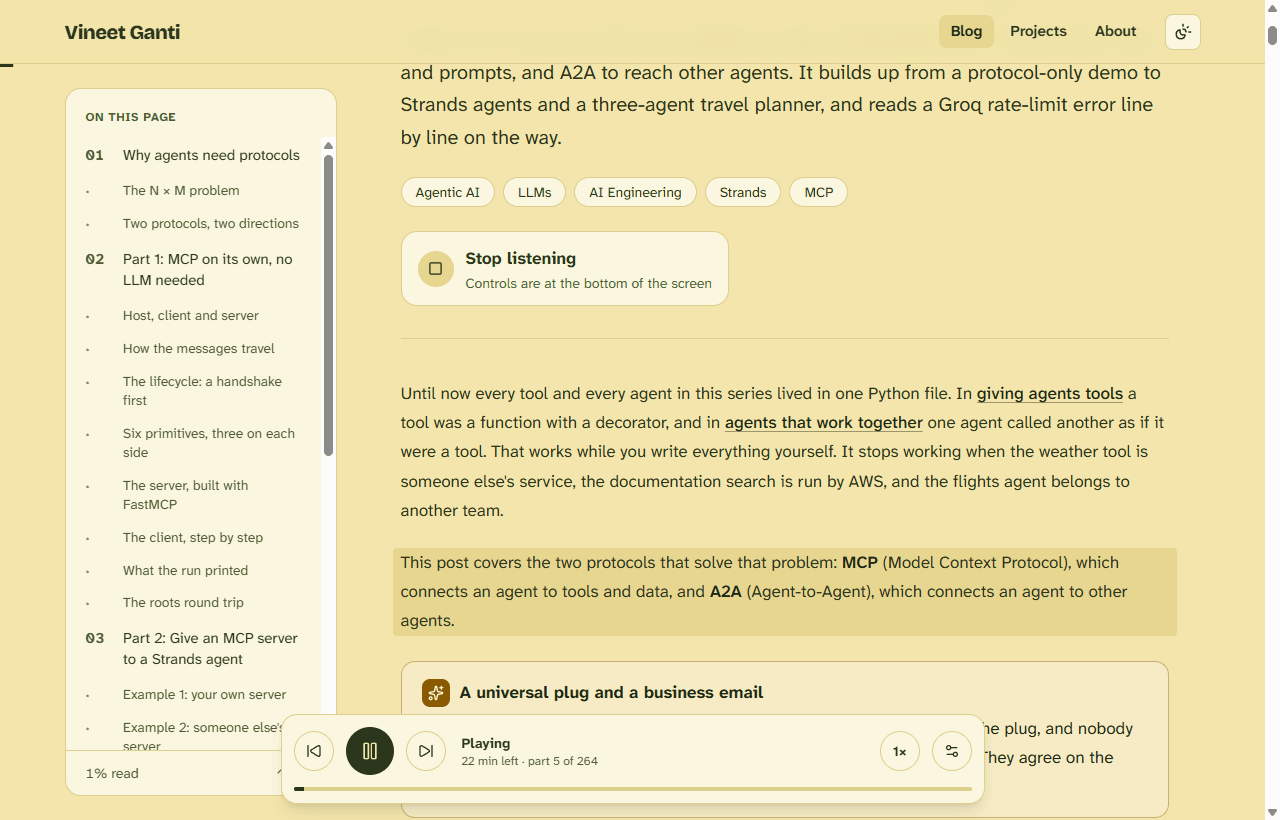
The posts here are long: some take well over half an hour to read. A Listen to this post button lets someone follow along while doing something else. There are two ways to build it:
| Browser voice (Web Speech API) | Pre-generated audio files | |
|---|---|---|
| Cost | Free | A text-to-speech service, per post |
| New posts | Work automatically | Need a generation step, and again after every edit |
| Voice quality | Depends on the reader's device | Consistent and natural |
| Download, lock-screen playback | No | Yes |
I chose the free one, and kept the door open: a post could later point to an MP3 and the player could prefer it.
#The hard part: what to read
Posts here are full of code, tables and diagrams. Read aloud, code and tables are unlistenable. So the player reads the prose, reads each diagram from its alt text (the written description every image already carries), and for code, tables and the collapsed recall questions says what it skipped. The logic lives in src/lib/speech.ts, separate from React so it is easy to test.
Data
const SKIPPED: Record<string, string> = {
  PRE: "Code example skipped.",
  TABLE: "Table skipped.",
  IMG: "Diagram skipped.",
  DETAILS: "Recall questions skipped.",
};

export function collectChunks(root: Element): SpeechChunk[] {
  // for each heading, paragraph, list item, code block, table, image and <details>:
  //   images            -> their alt text, spoken as "Image: ..." (a skip note if the alt is only a file name)
  //   code, tables, details -> one spoken note, once per run of the same kind
  //   text inside those -> ignored
  //   everything else   -> cleaned, then split into short chunks
}
It reads the rendered page (#post-content), not the Markdown source. That has two benefits: the paragraph being read can be highlighted, because each chunk keeps a reference to its element, and whatever the page shows is what gets spoken, including text that comes from components like Callout.
Three details make it sound right:
- Symbols are rewritten.
→becomes "to",×becomes "times", and dashes become commas, because otherwise a speech engine reads them out as "rightwards arrow". - Splitting avoids decimals. Sentences are split with a lookbehind,
/(?<=[.!?])\s+/, which only cuts after punctuation that is followed by a space. So "1.5×" stays whole and doesn't turn into "1" and "5". - Chunks are capped at 180 characters. Some browsers cut off a long utterance after about 15 seconds, so each piece stays short. It also makes skipping forward and back precise.
#Diagrams are read, too
The posts rely on diagrams, so skipping them lost half the lesson. Every image already has alt text, which is the description a screen reader would read, so the player reads that after the words "Image:". The rule that decides whether an alt text is a real description is deliberately simple: at least 12 characters and at least one space. An alt like flow_chart is a file name, not a description, so that image gets the skip note instead.
function imageDescription(el: Element): string {
  const alt = (el.getAttribute("alt") ?? "").trim();
  return alt.length >= 12 && /\s/.test(alt) ? alt : "";
}
Two consequences. First, good alt text now matters twice: it helps screen readers and it is what the player says, so the formatting guide says to write it as a description of what the picture shows. Second, there is a setting in the player to turn diagram reading off. Changing it mid-play rebuilds the chunk list and carries on from the same paragraph, and the choice is saved. The listening-time estimate counts the alt text too.
#The player: a small state machine
AudioPlayer.tsx is a client component. A few decisions are worth explaining.
Support and voices are read with useSyncExternalStore. Whether the browser can speak, and which voices it has, are facts about the outside world, not component state. Voices arrive late, on a voiceschanged event, so the component subscribes to that event. On the server, where nothing can speak, it returns nothing, so the page renders the same on server and client.
Pause is "cancel and remember". The Web Speech API's own pause() is unreliable in some browsers, so pausing cancels the current utterance, and resuming starts that chunk again. Changing the speed or the voice does the same thing: restart the current chunk with the new setting.
A generation counter stops stale callbacks. Cancelling an utterance can still fire its onend event, which would start the next chunk and undo the pause. Every call to speak takes a new number, and a callback only acts if its number is still the current one:
const speak = (i: number) => {
  const gen = ++genRef.current;          // a new "generation" invalidates every older callback
  synth.cancel();
  // ...highlight chunk i, set state...
  const utterance = new SpeechSynthesisUtterance(chunks[i].text);
  utterance.rate = prefsRef.current.rate;
  utterance.onend = () => {
    if (genRef.current === gen) speakRef.current(i + 1);   // only if nothing newer has started
  };
  synth.speak(utterance);
};
Highlighting scrolls only when needed. The block being read gets a tts-active class. If it drifts under the sticky header or the player bar, it is scrolled to the centre, and with the browser's reduced-motion setting on, the scroll is instant.
Settings are remembered. Speed and voice are saved to localStorage inside try/catch, because storage can be blocked, and the player works without it.
The time estimate has two sources. The button shows a server-computed figure (listenMinutes, from the Markdown with code, tables and images stripped, at about 165 words a minute). Once playing, the bar recomputes the time left from the chunks and the chosen speed.
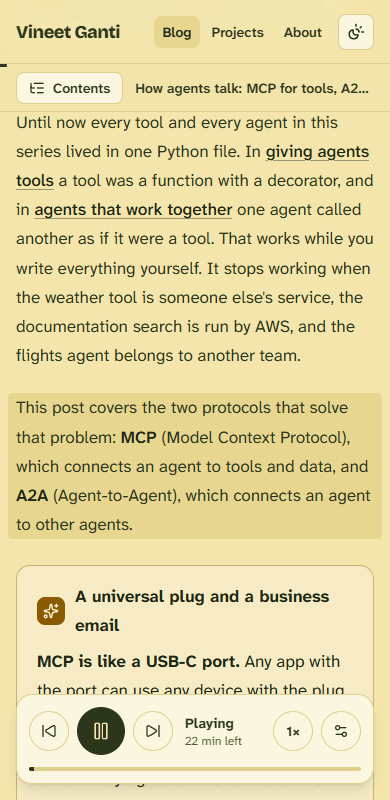
#Making it work on phones
After the first release, audio didn't play on phones, in Safari or in Chrome. I couldn't hold a phone to the code, so I read the player for the failure points that are known to bite mobile browsers, and found four real ones:
| Symptom on a phone | Cause in the code | Fix |
|---|---|---|
| Nothing is spoken | cancel() and speak() were called in the same instant. Mobile Safari and Chrome can drop speech queued like that | Only cancel when something is actually speaking or queued, and when restarting, wait 80 ms before speaking |
| It speaks one sentence, then freezes | The utterance object wasn't kept anywhere, and Chrome can garbage-collect it mid-speech, after which its end event never fires | Keep the current utterance in a ref |
| It stays silent after a pause | Mobile Chrome can leave the engine in a stuck "paused" state | Call resume() before every speak() |
| "Paused" and no explanation | A failed utterance was caught and ignored | Show the reason in the player |
Two safety nets sit on top, because phone browsers are inconsistent:
- A watchdog checks every half second. If speech started but the engine has gone idle without an end event, it moves on to the next chunk. If speech never started within 4.5 seconds, it stops and says so: "Nothing was spoken. Check the volume (and the silent switch on iPhone), then tap play again."
- Plain messages for refusals: if the browser blocks the audio (its autoplay rule) the player says to tap play again, instead of failing quietly.
The first tap still calls speak() straight away inside the click handler, because phones only allow speech that starts from a tap. The bar also now sits above the iPhone's home indicator, using env(safe-area-inset-bottom).
#How I tested speech without listening to it
You can't hear a unit test, but you can check everything except the sound. A script drove a headless Chrome over the DevTools protocol, replaced the browser's speak with a stub that records each text and fires onend a moment later, pressed Listen and let a whole post play through in seconds.
| Post | Chunks spoken | Words | Skip notes |
|---|---|---|---|
| How agents talk | 264 | about 3,600 | 19 code, 18 table, 1 recall (12 diagrams read) |
| Building my first AI agent | 144 | about 2,220 | 10 code, 4 table, 1 recall (5 diagrams read) |
| MapReduce post | 16 | about 230 | 1 code |
Each run finished by itself. The phone failure modes were tested the same way, in an emulated phone. A second test, with a stub that never finishes, pressed next, previous, pause, play, speed, voice settings and stop, and checked that the highlight and the bar came and went. Screenshots in light, dark and mobile found one real issue: the label was cut off on a phone, so the part counter is now hidden on small screens.
What this does not prove is how it sounds. That depends on the voices installed in the browser. Edge and Chrome offer "Natural" or "Online" voices that are far better than the defaults, so the voice picker lists those first.
#Limits
- No download, and some phones stop speech when the screen locks. (Posts with a recorded version, below, don't have this problem.)
- Anything that exists only in code or a table is skipped, and a diagram is only as good as its alt text, so the important point has to be in the prose or the description.
- Pronunciation of names and acronyms is whatever the voice decides.
#AI podcast versions: NotebookLM and the m4a player
The text-to-speech player is free and works on every post, but a browser voice reads like a screen reader. For the posts I most want people to finish, I wanted something closer to a podcast. So a post can now carry a recorded audio version, made with Google's NotebookLM, and the page shows a separate Listen to AI podcast version button for it.
#How the audio is made with NotebookLM
NotebookLM takes documents you give it as sources and can turn them into an Audio Overview: a spoken conversation between two AI hosts that explains and discusses the material. The workflow for a post is:
- Add the post as a source (the text of the article, or its published page).
- Generate an Audio Overview, and steer it with the optional focus prompt, for example "explain this to someone learning it for the first time and stick to the post's examples".
- Listen to the whole thing. If it drifts, misses a section or gets a detail wrong, generate it again with a sharper prompt. That is how the refined versions come about: the first take is rarely the one I publish.
- Download the audio as an m4a file and name it after the post's slug.
The result is a different kind of audio from the browser voice, so the two aren't redundant:
| Browser voice (Listen to this post) | AI podcast version | |
|---|---|---|
| Made by | The reader's device, live | NotebookLM, once, before publishing |
| Content | The post read word for word | A conversation about the post |
| Code and tables | Skipped with a spoken note | Described in conversation, if the hosts choose to |
| Cost per post | None | A few minutes of my time to generate and check |
| Works offline | No | Yes, after a download |
#Adding the file to a post: the walkthrough
The goal was that adding audio to a post is a couple of commands, with no frontmatter to edit and no component to wire up. The recordings are not stored in git: they are large, so they live in object storage (see Moving the audio out of git) and the site only keeps a list of which posts have one.
Step 1: name the file after the post. For the post at content/blog/hello-agent.mdx, the recording is hello-agent.m4a. It is kept locally in public/audio/, which git ignores.
Step 2: upload it. node --env-file=.env.local scripts/upload-audio.mjs sends every file in that folder to the storage bucket and adds the post's slug to content/audio.json, a small committed list:
{
  "hello-agent": "hello-agent.m4a"
}
Step 3: the build finds it. parsePost looks the slug up in that list and builds the address from a base URL:
const AUDIO_BASE_URL = (process.env.AUDIO_BASE_URL || "/audio").replace(/\/+$/, "");

function findAudio(slug: string, declared: unknown): string | undefined {
  if (typeof declared === "string" && /^(\/|https:\/\/)/.test(declared)) return declared;
  const file = readAudioManifest()[slug];
  return file ? `${AUDIO_BASE_URL}/${file}` : undefined;
}
No entry in the list means no audio, and the post is unchanged. In production AUDIO_BASE_URL points at the storage bucket. When it isn't set, it falls back to /audio, so recordings in the local folder still play in development. A post can also name its own file with audio: in the frontmatter, as a path or a full https:// address. The result is stored on the post as audioSrc.
Step 4: the page chooses a player. In the post page, one conditional decides which button appears:
{post.audioSrc ? (
  <RecordedAudio src={post.audioSrc} title={post.title} />
) : (
  <AudioPlayer minutes={post.listenMinutes} />
)}
A post with a recording gets the podcast button; every other post keeps the text-to-speech one. They aren't shown together because the browser voice highlights paragraphs as it reads, and two voices at once would be a mess.
Step 5: the RecordedAudio component. It looks like the text-to-speech player on purpose: the same card-style button in the post header, and a player bar that opens fixed to the bottom of the screen with play and pause, back 15 seconds, forward 30, a seek bar with the time, a speed button and a download link. Three details are worth knowing:
- The
<audio>element is always on the page, hidden. Phones only allow audio that starts from a tap, so the button's click handler callsplay()directly, which needs an element that already exists. preload="none". The file isn't downloaded until someone presses the button, so a post with a 20 MB recording costs nothing to people who never listen.- Failures are shown. If
play()is refused or the file can't load, the bar says so, in the same way the text-to-speech player does after the phone fix. The bar also sits above the iPhone home indicator. The download link adds?download=1for files on another address, because browsers ignore thedownloadattribute across origins and would play the file instead.
Step 6: ship it. Commit content/audio.json with the post and push. The audio itself is already in storage.
#Moving the audio out of git
The first version of this feature committed each m4a straight into public/audio/. That worked, but the files turned out to be large: the NotebookLM exports are 257 kbps stereo, about 40 MB each for a 20-minute episode, 433 MB across eleven files. Git keeps every committed copy forever and GitHub warns at 50 MB a file, so audio would have made the repository heavy while everything else on this blog is text and small SVGs.
So the recordings moved to Vercel Blob, with the site holding only the list and a base URL. I compared it with Cloudflare R2 first:
| Vercel Blob (Hobby) | Cloudflare R2 (free tier) | |
|---|---|---|
| Storage | 1 GB | 10 GB |
| Downloads | 10 GB a month | Free, unlimited |
| Over the limit | No charge, but Blob is blocked for 30 days | No hard cap |
| Setup here | Same dashboard, no DNS change | Needs a custom domain on Cloudflare, and this domain's DNS is elsewhere |
Blob won on setup, and the code doesn't depend on it: moving to R2 later is copying the files and changing AUDIO_BASE_URL. On Vercel's paid plan the audio would cost cents; the $20 a month platform fee is the real price, so a paid plan only makes sense if the site needs it for other reasons.
#Shrinking the files first
Hobby's 1 GB would have gone quickly at 433 MB, so before the upload I re-encoded every recording with ffmpeg:
ffmpeg -i in.m4a -vn -ac 1 -c:a aac -b:a 64k -movflags +faststart out.m4a
-ac 1makes it mono. The NotebookLM hosts are two voices, not music, so stereo adds almost nothing.-b:a 64kis 64 kbps AAC, down from 257 kbps. Speech sits mostly below 8 kHz, so what is lost is the very top of the spectrum and a little "air" on s and t sounds.-movflags +faststartputs the file's index at the front, so phones can start playing and seek without downloading the whole file first.
The eleven files went from 433 MB to 113 MB, about 10 MB for a 22-minute episode, with identical durations. That is 11% of Hobby's storage, and a full play of an episode costs about 10 MB of the 10 GB monthly transfer, roughly a thousand plays instead of 250.
#Limits
- Vercel's Hobby plan allows 1 GB of storage and 10 GB of downloads a month. Past that, the audio stops working until the month rolls over, although the site itself keeps working. Smaller files are the main defence, along with
preload="none". - Old copies of the five recordings that were committed before the move remain in git history.
- NotebookLM output varies between runs, so a recording can drift from the article after the article is edited. Regenerate it when the post changes materially.
- The recording is not part of the "About N min" estimate, which belongs to the browser voice.
#Notes: a text-only feed
Not everything is worth a blog post. A thought about a navigation app, a small annoyance, a one-line opinion: these don't need a title, a table of contents or a recall section. So there is now a second kind of content next to posts, called notes, and it works like a tweet wall or an RSS feed: short, plain text, newest first.
#How a note is written
A note is a small Markdown file in content/notes/. The front matter holds only a date, and everything below it is the text:
---
date: "2026-10-30T12:00"
---
The UX on navigation is better for Apple Maps on iPhone.

A blank line starts a new paragraph.
There are no titles, tags, images or links to render. Writing a note means creating one file. The first note is a short take on Apple Maps versus Google Maps on CarPlay.
#Reading and ordering
src/lib/notes.ts reads the folder, skips any file with no text or an unreadable date, and sorts by date, newest first. The date can include a time, which breaks ties between notes written on the same day:
.sort((a, b) => new Date(b.date).getTime() - new Date(a.date).getTime());
Only the date is shown on screen. A time zone on a statically built page would be a guess, so the time is used for ordering and nothing else.
#Two places to read them
/notesis the full feed. Each date is a link to that note's anchor, so a single note can be linked to.- The home page has a Notes section with the same list inside an isolated box about 26 rem tall that scrolls on its own.
overscroll-containstops the page from scrolling when the end of the box is reached, and the box can be focused with the keyboard, so it works without a mouse.
Both use one component, NoteList, so the two views can't drift apart.
#An RSS feed
/notes/feed.xml is a route handler that returns the notes as an RSS 2.0 feed. Each item's title is the first line of the note, up to 80 characters, and its link is the anchor on /notes. The text is escaped for XML, and the feed address is the site's own URL, written once at the top of the file.
#Limits
- The feed is for notes only. Blog posts don't have an RSS feed yet.
- Notes are plain text, so they can't hold a link, a list or code.
- I haven't opened the feed in a feed reader, only checked the generated XML.
#Part 2: A tour of the website's code
#The stack
| Layer | Choice |
|---|---|
| Framework | Next.js 16 with the App Router, React 19, TypeScript |
| Styling | Tailwind CSS 4, with the typography plugin for post text |
| Content | MDX files in the repo, read with gray-matter and rendered by next-mdx-remote |
| Markdown plugins | remark-gfm (tables), rehype-slug (heading ids), rehype-highlight (code colours) |
| Fonts | Bricolage Grotesque for headings, Atkinson Hyperlegible Next and Mono for body and code |
| Icons | lucide-react |
| Dates, reading time | date-fns, reading-time |
| Hosting | Vercel |
#The folder map
content/
  blog/            one .mdx file per post (the filename is the URL)
  projects/        one .md file per project card
  notes/           one .md file per note (a date and plain text)
  audio.json       which posts have a recording (slug to file name)
docs/              the MDX formatting guide
public/images/     diagrams and screenshots, by section / series / post
public/audio/      local copies of the recordings (git-ignored; the real files live in Vercel Blob)
scripts/           upload-audio.mjs, which sends recordings to storage
src/
  app/
    layout.tsx     fonts, the theme script, header, footer
    page.tsx       the home page
    globals.css    theme tokens and all the post styling
    blog/          /blog, /blog/[slug], /blog/topic/[section], /blog/series/[series]
    notes/         /notes and /notes/feed.xml (the RSS feed)
    projects/      /projects
    about/         /about
  components/      Header, Footer, ThemeToggle, PostCard, ProjectCard, SectionNav,
                   SeriesStrip, SeriesNav, TableOfContents, MdxContent, Callout,
                   CopyButton, AudioPlayer, RecordedAudio, NoteList
  lib/
    blog.ts        reads posts, builds the table of contents, series queries
    sections.ts    the sections and series
    speech.ts      the audio player's text logic
    notes.ts       reads and sorts the notes
    projects.ts    reads project files
next.config.ts     redirects and framework options
#The content pipeline
DataMetadataRequest or acknowledgment
There is no database and no API. The repository is the CMS:
- Read.
getAllPosts()listscontent/blog/*.mdx, reads each withfs, andgray-mattersplits the frontmatter from the body.parsePostturns that into aBlogPostand the list is sorted newest first. - Ask. Every page calls a query (
getAllPosts,getPostsBySection,getPostsBySeries,getPostBySlug) at build time. - Render. A post page passes the body to
MdxContent, which compiles the MDX on the server.
Projects work the same way, a step simpler: projects.ts reads content/projects/*.md and each file's frontmatter becomes a card.
#Rendering a post: MdxContent
<MDXRemote
  source={source}
  components={components}
  options={{ mdxOptions: { remarkPlugins: [remarkGfm], rehypePlugins: [rehypeSlug, rehypeHighlight] } }}
/>
next-mdx-remote/rsc compiles MDX inside a server component, so no MDX compiler is shipped to the browser. Four overrides turn plain Markdown into the site's design:
| Element | What replaces it |
|---|---|
h2, h3, h4 | The heading plus a hover # permalink, using the id rehype-slug made |
pre | A code-block with a language label and a Copy button |
table | The table inside a scrollable wrapper, so wide tables don't break the page |
<Callout> | A tinted box with an icon, in five types: note, info, tip, analogy and warn |
The copy button is a client component that reads the sibling pre and writes its text to the clipboard, and it handles a blocked clipboard silently.
#The table of contents
getHeadings() in blog.ts parses the post with unified and remark-parse, walks the headings with unist-util-visit, and creates ids with the same slugger that rehype-slug uses, in the same order. That is what keeps the contents entries and the page's real heading ids matching, even when two headings share a name. The shallowest heading level present becomes the top level, with one level of sub-entries.
TableOfContents is a client component that adds:
- scrollspy: the current section is the last heading above a point near the top of the screen, and at the very bottom it selects the last entry, so short final sections still count;
- a reading-progress bar under the header;
- a mobile bar with a contents menu that closes on Escape;
- scroll updates throttled to one per animation frame.
#Layout, fonts and the theme
layout.tsx loads the three fonts as CSS variables, sets the page title template (%s | Vineet Ganti), and puts a small inline script in the head:
const themeScript = `try{var t=localStorage.getItem("theme");if(t==="light"||t==="dark")document.documentElement.setAttribute("data-theme",t)}catch(e){}`;
It runs before the first paint, so a saved theme is applied with no flash of the wrong colours.
The theme itself is a set of CSS variables in globals.css: the "vanilla and olive" palette (--paper, --card, --ink, --accent, and so on). The light values are on :root. Dark values apply in two cases: when the system prefers dark and no theme is chosen (:root:not([data-theme="light"])), and when the user picks dark (:root[data-theme="dark"]). ThemeToggle flips data-theme and saves the choice.
tailwind.config.mts then maps colour names such as ink, card, accent and border to those variables. A component writes text-ink or bg-card, and the same class is correct in both themes. No component has a dark: variant.
#The pages
| Route | Type | Notes |
|---|---|---|
/ | Static | Hero, a scrollable notes feed, featured projects, the three latest posts |
/notes | Static | Every note, newest first |
/notes/feed.xml | Static route handler | The notes as an RSS 2.0 feed |
/blog | Static | Section chips, series cards, all posts |
/blog/[slug] | Static, one per post | Header, table of contents, content, audio player, series navigation |
/blog/topic/[section] | Static, one per section | A section's series and posts |
/blog/series/[series] | Static, one per series | A series in order |
/projects | Static | All project cards |
/about | Static | Text and contact links |
Dynamic routes list what to build with generateStaticParams, and the build prints each one. The config enables cacheComponents and partialPrefetching, and the post pages show up as partially prerendered. The header's active link is a simple prefix match on the path, so /blog/topic/... keeps "Blog" highlighted without any extra code.
#Guard rails
| What | How |
|---|---|
| A writing guide | docs/mdx-formatting-guide.md: frontmatter, callouts, images, and MDX gotchas such as stray < and { in prose |
| The build is the test | next build type-checks and prerenders every page, so a broken post fails the build |
| Lint | eslint with the Next.js config |
| Content checks | The throwaway script described above, run after bulk edits |
| Fallbacks | An unknown section falls back to Essays, a missing date to today, blocked storage is ignored |
#Summary
The blog now has three layers: a section (the shelf), a series (the reading order) and tags (the detail). Sections and series live in one config file, parsePost validates the new frontmatter, small queries filter posts, and two new routes give every section and series a shareable, prerendered page. Posts got readable slugs with permanent redirects from the old ones, and images moved to public/images/<section>/<series>/<post>/. The audio player reads the rendered prose and each diagram's description with the browser's text-to-speech, says what it skips, highlights the current paragraph, and stays correct through pauses and skips thanks to a generation counter. Playback on phones needed four fixes and a watchdog, and it has been tested only in an emulated phone. The site underneath is simple on purpose: MDX files in, static pages out, with the theme driven by CSS variables.
#Concepts at a glance
| Concept | In one line | Why it matters |
|---|---|---|
| Section | The shelf a post sits on, one per post | Browsing by topic |
| Series | An ordered reading list with seriesOrder | Part N of M, previous and next |
| Tag | Free-form detail | Finer topics without a new section |
sections.ts | The one place sections and series are defined | Adding one needs no code changes elsewhere |
parsePost | Turns a file into a BlogPost, with fallbacks | A bad value never breaks the build |
generateStaticParams | Lists the pages to prerender | Every section and series is static HTML |
| 308 redirect | A permanent redirect from an old URL | Renamed posts keep working links |
| Web Speech API | The browser's built-in text-to-speech | Free audio with no files |
collectChunks | Prose in, short speakable chunks out, with skip notes | Code and tables aren't read aloud |
| Generation counter | Each speak call invalidates older callbacks | Pause and skip stay reliable |
| Alt-text reading | Diagrams are spoken from their image description | Pictures aren't lost, and alt text matters twice |
| Watchdog | A timer that notices speech that never started or never ended | Phones drop events, so it moves on or explains |
| Audio overview | A two-host spoken conversation NotebookLM generates from a source | The AI podcast version of a post, checked before publishing |
| Object storage | Large files live in a bucket, and the site keeps a list plus a base URL (AUDIO_BASE_URL) | Git stays small, and changing provider is a copy plus one setting |
| Notes | Dated plain-text files in content/notes/, shown newest first on /notes, the home page and an RSS feed | Short thoughts without the weight of a post |
useSyncExternalStore | Reads browser facts (support, voices) | Server and client render the same |
| Theme tokens | CSS variables mapped to Tailwind colour names | One class works in light and dark |
MdxContent | Compiles MDX on the server with custom components | Callouts, copy buttons and heading links |
#Test yourself
Why are there three layers (section, series, tag) and not one?
Each does a different job. A section is a small, stable shelf. A series is an order. A tag is free-form detail. A post can be on a shelf without being in a series, and tags alone can't express order.
What happens to a post with a missing or misspelled section?
parsePost falls back to the default, Essays & Ideas, so the build doesn't break and the post still appears.
Why is a series ordered by seriesOrder and not by date?
Two posts in a series can share a date, and a date can change. An explicit order is stable.
Why did renaming the posts need redirects(), and why is it permanent?
Old URLs may be linked from elsewhere. A permanent (308) redirect sends visitors to the new slug, and browsers and search engines remember it.
Why does the audio player read the rendered page and not the Markdown?
So each spoken chunk can point at a real element to highlight, and so that whatever the page actually shows (including text from components) is what gets read.
What does the generation counter protect against?
A cancelled utterance can still fire its end event, which would start the next chunk and undo a pause. Each speak call takes a new number, and a callback only acts if its number is still current.
Why might speech work on a laptop but not on a phone?
Phone browsers are stricter: speech must start from a tap, cancelling and speaking in the same instant can drop the speech, an utterance can be garbage-collected so its end event never fires, and the engine can be left paused. The player avoids each of those and has a watchdog for what slips through.
How is a note different from a blog post?
A note is a dated plain-text file in content/notes/: no title, tags, images or page of its own. Notes appear newest first on /notes, in a scrollable box on the home page and in an RSS feed, while posts have their own pages, sections and series.
How does a post get an AI podcast version?
Generate an Audio Overview of the post in NotebookLM, check it, download the m4a and save it as <post-slug>.m4a in public/audio/. Run the upload script, which sends it to storage and lists it in content/audio.json. The build finds it by slug, and the post page shows the podcast button instead of the browser-voice one.
Why does the podcast player keep a hidden audio element on the page?
Phones only allow audio that starts from a tap. The button's click handler calls play() on an element that already exists, so playback counts as user-initiated.
How does the player read a diagram?
It reads the image's alt text after the words "Image:". Alt text counts only if it is a real description (at least 12 characters with a space), so a file name is skipped with a note.
How can the whole player be tested without hearing anything?
Replace the browser's speak with a stub that records the text and fires the end event, drive the page in a headless browser, and check what was spoken, what was skipped and that the controls behave.
How does one CSS class work in both light and dark mode?
Tailwind colour names point at CSS variables, and the dark theme only redefines those variables, so text-ink or bg-card stays the same in every component.
#Update log
Every change to the site is logged here under the day it was made, oldest day first. New updates go in a new dated heading at the bottom of this list.
#2026-10-29
| Type | Change |
|---|---|
| Feature | Sections, series and tags, with /blog/topic and /blog/series pages, "Part N of M" and previous/next links |
| Change | LLM Architectures posts renamed to readable slugs, with permanent redirects. Images moved to public/images/<section>/<series>/<post>/ |
| Feature | Listen to this post audio player: browser text-to-speech, reads prose, skips code, tables and diagrams with a spoken note, highlights the paragraph, speed and voice controls |
| Fix | Audio did not play on mobile Safari and Chrome. Four causes fixed: cancel and speak in the same instant, an utterance discarded before it finished, a stuck paused engine, and failures hidden from the reader. Added a watchdog and visible messages, and lifted the bar above the iPhone home indicator |
| Feature | Diagram reading. The player now reads each image's alt text, with a setting to turn it off, and the listening-time estimate counts it |
The phone fix was tested in an emulated phone with a stubbed speech engine, not on a physical device. If it still fails on yours, the player now shows a message saying why.
#2026-10-30
| Type | Change |
|---|---|
| Feature | AI podcast versions. A post can carry an m4a made with NotebookLM: upload <slug>.m4a to storage and list it in content/audio.json, and the post shows a Listen to AI podcast version button and a bottom player bar, in place of the browser-voice button |
| Feature | Notes. Short, dated, plain-text entries in content/notes/, shown newest first on a new /notes page, in a separate scrollable box on the home page, and as an RSS feed at /notes/feed.xml. Added a Notes link to the header |
| Change | The first note (Apple Maps versus Google Maps) was first written as a blog post in a short-lived Notes blog section. It was moved into the notes feed and that section was removed |
| Change | Audio moved out of git. The recordings were re-encoded from 433 MB to 113 MB (mono AAC, 64 kbps) and now live in Vercel Blob. The site keeps content/audio.json and an AUDIO_BASE_URL setting, and scripts/upload-audio.mjs uploads new files |
#2026-11-03
| Type | Change |
|---|---|
| Feature | Diagram motion. Diagrams below the fold fade their parts in, in drawing order, as they scroll into view, and dashed arrows drift on hover. It is one small client component plus CSS rules, applies to every inlined SVG, and is off with reduced motion, without JavaScript and in print |
| Feature | Live charts. Five charts in three posts are now interactive: the queueing knee, the naive batch fill wait, the Poisson arrivals, the decode latency against context length, and the weight memory by precision. Each has sliders, a sentence that restates the numbers, and starts at the values its picture showed. The charts that are sketches or measurements stayed as pictures, because moving them would invent data |
| Content | Data Engineering SQL series. A new Data Engineering section with a six-post practice bank of 92 questions. The posts are generated by a Python script that loads each question's sample data into DuckDB, runs the answer, and writes the expected outputs from the real results, so no output is typed by hand; answers marked as safe to re-run are run twice and the build fails if anything changes |
| Feature | Data traces. Each answer has a step-through component that shows the tables at each stage of the query, with inserted, removed, changed and wrong rows tinted and labelled in words, built from the same DuckDB runs |
#What's next
- Tags are still free-form and a little inconsistent. A small fixed list would make them a better filter.
- The older essays haven't had the recall treatment the series posts got.
- No sitemap, search or RSS feed for blog posts yet (the notes already have one).
- Record podcast versions for the long series posts first, since those are the ones people most want to listen to.
- If recordings pile up, move them out of the git repository into object storage.
#Resources
- The repository and the writing guide
- Web Speech API: SpeechSynthesis on MDN
- NotebookLM and its Audio Overview feature
- The HTML audio element on MDN
- Next.js: redirects and generateStaticParams
- next-mdx-remote